Choosing the right VPN protocol for your iPhone can improve speed, privacy, and battery life. Here’s a quick breakdown of the top three options for iOS:
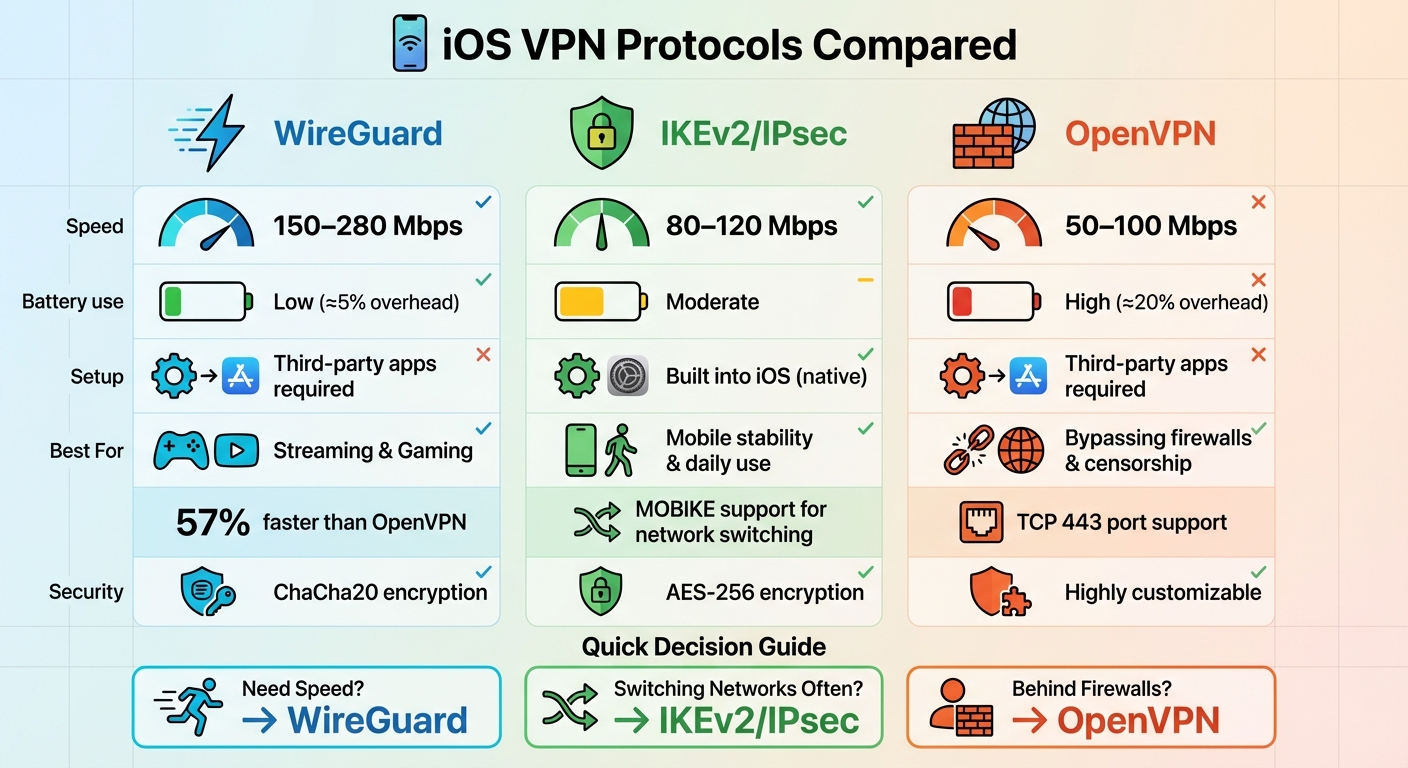
- WireGuard: Fastest speeds (150–280 Mbps), efficient battery usage, and minimal data overhead (≈5%). Requires third-party apps but works great for streaming and gaming.
- IKEv2/IPsec: Built directly into iOS, offering stable connections during network switching (80–120 Mbps). Perfect for mobile users but struggles with restrictive networks.
- OpenVPN: Best for bypassing firewalls and heavy censorship. Slower speeds (50–100 Mbps) and higher data usage (≈20%), but highly flexible for custom setups.
Quick Comparison Table:
| Protocol | Speed | Battery Use | Setup | Best For |
|---|---|---|---|---|
| WireGuard | 150–280 Mbps | Low (≈5%) | Third-party apps | Streaming, gaming |
| IKEv2/IPsec | 80–120 Mbps | Moderate | Built into iOS | Mobile stability, daily use |
| OpenVPN | 50–100 Mbps | High (≈20%) | Third-party apps | Firewall bypassing |
Bottom Line: Use WireGuard for speed and efficiency, IKEv2 for seamless network switching, and OpenVPN for challenging network environments. Each protocol has strengths depending on your needs.
iOS VPN Protocol Comparison: WireGuard vs IKEv2 vs OpenVPN Speed and Performance
How VPN Protocols Work on iOS
VPN Protocol Basics: Security, Speed, and Battery Impact
Every VPN protocol works by creating an encrypted tunnel between your iPhone and the VPN server, but the way they achieve this varies. These differences in encryption methods, codebase size, and connection architecture impact three key areas: security, speed, and battery usage.
Take WireGuard, for example. Its streamlined codebase reduces processing demands compared to OpenVPN and IKEv2/IPsec, which helps conserve battery life. WireGuard also uses a “connect as needed” model, avoiding constant connections and further saving power.
“WireGuard offers the best battery efficiency due to its streamlined code and ‘connect as needed’ approach that doesn’t maintain persistent connections.”
- Craig McCart
On the other hand, OpenVPN’s more complex encryption requires significant processing power, which can drain your battery faster during active use. IKEv2/IPsec lands somewhere in the middle – it’s efficient because it integrates directly with iOS at the system level, but it still maintains a more active connection compared to WireGuard.
These distinctions in how protocols function set the stage for understanding how native integration plays a role in optimizing iOS performance.
Native vs. Third-Party Protocol Support on iOS
IKEv2/IPsec is the only protocol natively supported by iOS. You can set it up directly through Settings → General → VPN & Device Management without needing any extra apps. Its native integration enables features like “VPN On Demand”, which automatically connects for specific domains, and “Always On VPN” for supervised devices.
WireGuard and OpenVPN, however, require third-party apps to work on iPhones. These apps need user authorization to configure VPN settings, but popular options like NordVPN, ExpressVPN, and the standalone WireGuard app make this process seamless.
While IKEv2 benefits from its built-in iOS support with better power management and system stability, WireGuard still outshines it in battery efficiency thanks to its lightweight design. Additionally, many modern VPN apps now integrate with Siri Shortcuts, allowing you to connect or disconnect with a simple voice command. Apps like NordVPN, Proton VPN, and Private Internet Access already offer this feature.
How We Compare VPN Protocols on iOS
When evaluating VPN protocols, we focus on six performance factors: security, connection speed, network switching reliability, battery usage, ease of setup, and compatibility with major VPN services. Our comparisons emphasize real-world performance on iOS rather than just theoretical specs.
Network switching is a key consideration, especially when moving between Wi-Fi and cellular networks. IKEv2 uses MOBIKE (Mobility and Multihoming Protocol) to maintain a seamless connection during these transitions. WireGuard also reconnects almost instantly after interruptions, while OpenVPN often struggles, requiring manual restarts or experiencing longer delays.
Background performance is equally important, as iOS frequently terminates background processes to conserve power. Both WireGuard and IKEv2 handle these interruptions better than OpenVPN, which may need manual reconnection if the app is closed by iOS. For users experiencing connection issues, the WireGuard app allows adjustments to MTU (Maximum Transmission Unit) settings, which can help resolve inconsistencies.
These insights highlight how different protocols impact your overall iOS experience, ensuring you stay protected without unnecessary disruption.
VPN Protocol Comparison for iOS
WireGuard: Fast and Efficient
When it comes to speed, WireGuard takes the crown for iOS users. In practical iOS tests, it achieved impressive speeds between 150–280 Mbps while only increasing mobile data usage by about 5%. Independent studies reveal that WireGuard is approximately 57% faster than OpenVPN across various server locations. For instance, NordVPN’s WireGuard-based NordLynx protocol can hit speeds between 300–445 Mbps on a 500 Mbps connection.
However, there’s a small catch: setting up WireGuard on iOS requires a third-party app. While it exclusively uses UDP, which some restrictive networks may block, its ChaCha20 encryption ensures robust security. Leading VPN providers have addressed WireGuard’s default IP logging concerns by adopting Double NAT systems to enhance privacy.
| Feature | Strength | Weakness |
|---|---|---|
| Speed | Very High (150–280 Mbps on iOS) | – |
| Battery Efficiency | Excellent (≈5% overhead) | – |
| Ease of Setup | User-friendly in dedicated apps | Requires third-party apps |
While WireGuard delivers unmatched speed, the next option prioritizes stability and seamless integration with iOS.
IKEv2/IPsec: Stable and Built Into iOS
For those seeking a native solution, IKEv2/IPsec is built directly into iOS. You can access it via Settings → General → VPN & Device Management, making it a favorite among enterprise users. Features like VPN On Demand and Always On VPN (for supervised devices) enhance its utility, especially for professional environments. Its MOBIKE support ensures smooth connections even when switching between networks .
In speed tests, IKEv2 reached 80–120 Mbps, offering solid performance paired with AES-256 encryption for strong security. While its battery efficiency is better than OpenVPN, it doesn’t quite match WireGuard. Additionally, IKEv2 can struggle on networks with strict firewall rules, limiting its flexibility.
| Feature | Strength | Weakness |
|---|---|---|
| Stability | Excellent on mobile (MOBIKE support) | Moderate speed (80–120 Mbps) |
| Integration | Native iOS support | Limited flexibility |
| Ease of Setup | Simple manual setup via iOS settings | Struggles in restrictive networks |
IKEv2/IPsec offers a seamless experience for iOS users, but if adaptability is your priority, the next protocol might be a better fit.
OpenVPN: Flexible and Secure

For users navigating restrictive networks, OpenVPN stands out as the most adaptable choice. Its ability to operate on TCP port 443 – the same port used for HTTPS traffic – makes it incredibly difficult for firewalls to block without disrupting regular internet access. OpenVPN also provides extensive customization options, including the flexibility to switch between TCP and UDP modes based on network conditions.
However, this flexibility comes at a cost. OpenVPN’s complex codebase requires significant processing power, resulting in slower speeds of 50–100 Mbps on iOS and increasing mobile data usage by about 20% . Additionally, its resource-heavy encryption can lead to noticeable battery drain. Like WireGuard, OpenVPN requires a third-party app, such as OpenVPN Connect, and may need manual reconnection when changing networks.
| Feature | Strength | Weakness |
|---|---|---|
| Flexibility | Extensive customization options | Complex setup |
| Firewall Evasion | Effective in restrictive networks (TCP 443) | Slower speeds (50–100 Mbps) |
| Battery Impact | Suitable for short sessions | Higher resource usage (≈20% overhead) |
While OpenVPN’s adaptability is unmatched, its performance trade-offs make it better suited for specific use cases rather than everyday use. Each protocol has its strengths, so the best choice depends on your priorities – whether it’s speed, stability, or flexibility.
sbb-itb-e1a0769
Best Protocol for Different Use Cases
Each VPN protocol has its strengths, making it ideal for specific scenarios. Here’s how they stack up for different needs.
Best for Streaming and Gaming
If you’re into 4K streaming or competitive gaming on iOS, WireGuard is your go-to. Its lightweight design reduces processing strain, which means better battery life and smoother performance. For gamers, low latency is a game-changer, and WireGuard’s ChaCha20 encryption processes data faster than AES-256. Plus, it seamlessly switches between Wi-Fi and cellular networks, reducing buffering issues.
“WireGuard is perfect for streaming video over VPN, especially on far away servers when unblocking geo-restricted sites like Voot or Netflix.” – VPNUniversity
While WireGuard shines in high-performance scenarios, it might not be the best fit for everyday browsing or public Wi-Fi usage.
Best for Public Wi-Fi and Daily Use
When you’re hopping between networks all day – like on public Wi-Fi or during your commute – IKEv2/IPsec is a smart pick. Thanks to its MOBIKE feature, it handles network switching effortlessly, so you stay connected without interruptions. Built directly into iOS, it doesn’t require extra apps, which not only simplifies setup but also helps conserve battery life.
“IKEv2 dominates mobile recommendations due to its exceptional network switching capabilities.” – vpnsuggest.com
For those with more specialized needs, a different protocol might be better suited.
Best for Work and Custom Setups
If you work remotely or need a VPN for a corporate environment, OpenVPN is a solid choice. IT teams love it for its flexibility – it allows for custom configurations like port selection, encryption types, and certificate-based authentication. Plus, its ability to run on TCP port 443 makes it nearly impossible to block since it mimics regular HTTPS traffic.
“We use OpenVPN almost entirely, including for on-demand auto VPN profiles… I love OpenVPN because it works on everything.” – Manager of large iOS deployments
For iOS users, the OpenVPN Connect app is necessary to import custom .ovpn configuration files provided by your workplace. Despite being around since 2001, OpenVPN remains a trusted choice for security-critical environments.
Conclusion
Main Findings
Choosing the right VPN protocol depends on what matters most to you. WireGuard stands out for its speed and efficiency. Thanks to its streamlined codebase, it delivers speeds roughly 57% faster than OpenVPN’s more moderate performance. It’s also the best choice for conserving battery life, as it generates minimal data overhead compared to OpenVPN. If you’re frequently on the move, IKEv2/IPsec shines with its MOBIKE feature, which ensures smooth transitions between Wi-Fi and cellular networks. Meanwhile, OpenVPN remains a go-to for bypassing firewalls and censorship. When configured to run over TCP port 443, it disguises VPN traffic as regular HTTPS browsing, making it a reliable choice for restrictive environments.
“WireGuard has revolutionized the VPN landscape with its minimal codebase… and innovative approach to encryption.” – Craig McCart, Antivirus and Cybersecurity Expert
The table below provides a quick reference to match each protocol with its strengths.
How to Choose the Right Protocol
Here’s a summary table to help you identify the protocol that best fits your needs:
| Priority | Protocol | Why? |
|---|---|---|
| Fastest Speeds | WireGuard | Delivers low latency and high throughput. |
| Best for Mobile Stability | IKEv2/IPsec | Seamlessly switches networks using MOBIKE. |
| Advanced Configurations | OpenVPN | Highly customizable encryption and port settings. |
| Battery Life | WireGuard | Lightweight code reduces CPU usage. |
| Bypassing Firewalls | OpenVPN | Operates on any port, including TCP 443. |
| No Third-Party Apps | IKEv2/IPsec | Can be configured directly in iOS settings. |
For most iOS users, WireGuard offers an excellent all-around experience. However, if you’re frequently switching networks, IKEv2/IPsec ensures uninterrupted connectivity. And for navigating strict network restrictions, OpenVPN is a dependable backup. The best part? Many top VPN apps let you switch between these protocols in just a few seconds, giving you the flexibility to adapt to any situation.
FAQs
What are the main differences between WireGuard, IKEv2/IPsec, and OpenVPN for iOS?
WireGuard, IKEv2/IPsec, and OpenVPN each bring distinct advantages to the table for iOS users, depending on what you prioritize – whether it’s speed, stability, or battery efficiency.
WireGuard is a cutting-edge protocol designed with simplicity and performance in mind. On iOS, it delivers impressive speeds, reaching up to 280 Mbps in tests. It’s also incredibly efficient, minimizing battery drain and offering smooth reconnections when switching between Wi-Fi and cellular networks. If speed and energy efficiency are your main concerns, WireGuard is hard to beat.
IKEv2/IPsec comes pre-installed on iOS, making it a convenient option that doesn’t require downloading extra apps. It’s well-regarded for its robust encryption and rock-solid connection stability, ensuring your VPN stays active even as you move between different networks. While its speeds are respectable, they don’t quite match what WireGuard can achieve.
OpenVPN stands out for its flexibility and broad platform support. However, its larger codebase means it’s more demanding on system resources, leading to slower speeds and greater battery usage on iOS. That said, it’s a dependable option for users who need extensive compatibility or advanced configuration options.
The right protocol for you will depend on your specific needs – whether you’re chasing top-notch speed, reliable stability, or platform versatility.
Which VPN protocol is the best for saving battery life on my iPhone?
If you want to save battery life on your iPhone while using a VPN, WireGuard is a solid pick. It’s built to be lightweight and efficient, which means it uses less power compared to protocols like OpenVPN or IKEv2.
Beyond being battery-friendly, WireGuard offers fast connection speeds and strong security features. This makes it a great option for iOS users who care about both performance and conserving energy.
How does my choice of VPN protocol impact speed and security on iOS?
The VPN protocol you pick can play a big role in determining your internet speed and security on iOS. WireGuard is often the speed champion, showing speeds up to 57% faster than OpenVPN in tests. Plus, it uses ChaCha20 encryption, which ensures your connection stays secure without sacrificing performance.
IKEv2/IPsec is another solid option, offering strong security and excellent stability, especially when moving between networks. This makes it a smart choice for mobile users who need a seamless browsing experience.
While older protocols like OpenVPN and L2TP/IPsec remain reliable and secure, they generally can’t match the speed of newer options. If speed is your main concern, WireGuard is a top pick. On the other hand, if you need a protocol that handles network changes effortlessly, IKEv2 is hard to beat.