
Split tunneling is a VPN feature that lets you divide your internet traffic. Some data is encrypted and routed through the VPN, while other traffic bypasses it, connecting directly to the internet. This setup can boost speeds for non-sensitive activities like streaming or gaming and reduce bandwidth usage. Here’s a quick look at the top VPN services offering split tunneling:
- NordVPN: Available on Windows, Android, and Android TV. Browser extensions support URL-based exclusions. Pricing starts at $3.39/month (2-year plan).
- Surfshark: Features “Bypasser” for apps and URLs on most platforms, including iOS. Allows unlimited device connections for $1.99/month (2-year plan).
- IPVanish: Supports app- and domain-based split tunneling on Windows, Android, Fire TV, and more. Pricing starts at $2.19/month (2-year plan).
- Private Internet Access (PIA): Offers advanced app-, IP-, and route-based split tunneling. Unlimited connections for $2.03/month (3-year plan).
- ExpressVPN: Works on Windows, macOS, Android, Linux, and routers. Offers app- and IP-based routing with high-speed servers. Plans start at $6.67/month (1-year plan).
Quick Comparison
| VPN Provider | Split Tunneling Platforms | Simultaneous Connections | Best Monthly Price (24–36 months) |
|---|---|---|---|
| ExpressVPN | Windows, macOS, Android, Linux, Router | 8–14 | $6.67 |
| NordVPN | Windows, Android, Android TV | 10 | $3.39 |
| Surfshark | Windows, macOS, Android, iOS | Unlimited | $1.99 |
| IPVanish | Windows, Android, Fire OS | Unlimited | $2.19 |
| Private Internet Access (PIA) | Windows, macOS, Android, Linux | Unlimited | $2.03 |
Split tunneling is ideal for balancing security and performance. Whether you prioritize speed, device compatibility, or cost, it’s important to choose the right VPN to meet your needs.
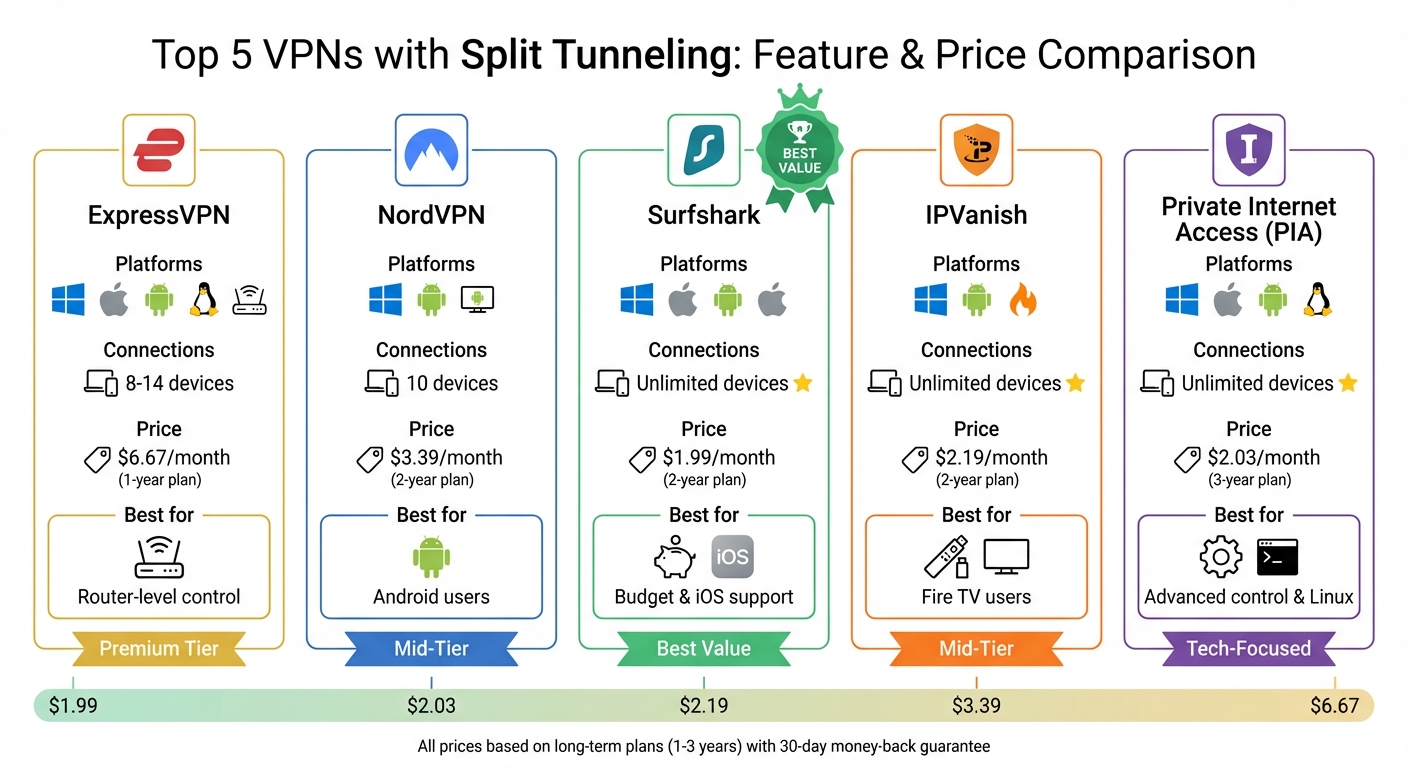
Top 5 VPNs Split Tunneling Features and Pricing Comparison
Split Tunneling: The VPN Trick You Should Know 🔐📱 #VPN #tech #cybersecurity #shorts
sbb-itb-e1a0769
1. ExpressVPN
ExpressVPN offers split tunneling for Windows, macOS, Android, Linux, and routers, making it a flexible choice for various platforms. On Windows 10 and 11, you can route traffic by app, IP address, or even subnets using CIDR notation. However, Windows 11 on ARM64 is not yet supported. For macOS users running Big Sur (v11+) or later, the feature allows app- and IP-level routing, though you’ll need to manually approve a system extension in the Privacy & Security settings.
Android devices with version 7.0 or higher support app-level split tunneling, while Linux users can configure the feature using either a graphical interface or the command line. On routers, ExpressVPN provides a “Device Groups” feature, enabling you to assign entire devices – like smart TVs or gaming consoles – to either use the VPN or connect directly to the internet. Regardless of your split tunneling setup, all DNS queries are routed through ExpressVPN’s private servers to prevent leaks.
Setting up split tunneling requires disconnecting from the VPN first. You then toggle the “Enable Split Tunneling” option and choose which apps or IP addresses to include or exclude. Selecting “App include” ensures only specific apps use the VPN, while “App exclude” keeps all apps on the VPN except those you specify. This setup is particularly useful for protecting sensitive activities, like torrenting, while maintaining faster speeds for gaming or streaming on your regular connection.
ExpressVPN supports up to 8 simultaneous connections per subscription and operates high-speed 10 Gbps and 40 Gbps RAM-only servers across 105 countries. Pricing starts at $12.95 per month for a standard monthly plan, or $6.67 per month with a one-year subscription. All plans include a 30-day money-back guarantee for new users. With a 10/10 TrustScore from ProPrivacy and endorsements from CNET, ExpressVPN delivers strong performance and security features that justify its premium pricing. Up next, take a look at NordVPN’s split tunneling features.
2. NordVPN
NordVPN offers split tunneling on Windows, Android, and Android TV, with additional URL-based options through browser extensions for Chrome, Firefox, and Edge. Unfortunately, iOS users won’t find split tunneling due to Apple’s restrictions. On macOS, this feature is only available via the browser extension, which allows you to exclude specific websites rather than entire applications.
For Windows users, enabling split tunneling is straightforward: click the cogwheel icon, navigate to “Split tunneling”, toggle it on, and pick the apps you want to exclude. On Android, you’ll find the feature under “Profile” > “Settings” > “Split tunneling”, where you can configure similar options. NordVPN provides two modes for split tunneling: you can either disable the VPN for selected apps (standard mode) or enable the VPN for specific apps only, allowing everything else to bypass the VPN (inverse split tunneling). If you’re using the browser extensions, the “Exclude from VPN” option lets you bypass the VPN for particular domains.
Experts have praised NordVPN’s split tunneling for its security:
“NordVPN split tunneling offers one of the most secure split tunneling in VPN implementations, allowing users to selectively route apps outside the VPN while maintaining strong encryption for sensitive activities.”
- Michael, VPN Expert, VPN.com
NordVPN supports up to 10 simultaneous connections across all subscription tiers. It uses the NordLynx protocol, which is based on WireGuard, offering an average speed of 206.64 Mbps alongside strong security measures. Pricing starts at $12.99 per month for a monthly subscription on the Basic plan, or $3.39 per month with a two-year commitment. All plans come with a 30-day money-back guarantee.
Surfshark, by comparison, also provides split tunneling features while allowing unlimited device connections.
3. Surfshark
Surfshark includes a feature called “Bypasser”, available on Windows, macOS, Android, iOS, and major browser extensions. The functionality varies slightly across platforms:
- Android: Offers app- and URL-based split tunneling, along with a Reverse Bypasser for both options.
- Windows: Supports app- and URL-based split tunneling, with Reverse Bypasser available for apps only.
- macOS: Allows adding apps and websites to a bypass list. Users can choose between “Bypass Surfshark” (specific apps bypass the VPN) or “Only use Surfshark” (specific apps only use the VPN).
- iOS: Supports URL-based split tunneling for specific website addresses.
Activating Bypasser is simple. Open the Surfshark app, go to Settings > VPN Settings > Bypasser, toggle it on, and add your chosen apps or websites. To test if it’s working, check the IP addresses on two different sites. This straightforward setup highlights Surfshark’s focus on user convenience.
Justin Schamotta, a cybersecurity and VPN expert from BleepingComputer, praised Surfshark’s usability:
“Surfshark is our recommended provider. It has an easy-to-use split tunneling feature and works great with streaming platforms.” You can explore more VPN use cases to find the best fit for your security needs. – Justin Schamotta, Cybersecurity & VPN Expert, BleepingComputer
Surfshark also offers unlimited device connections, over 3,200 RAM-only servers in 100+ countries, and speeds tested up to 698 Mbps. Pricing starts at $15.45 per month, or $1.99 per month with a two-year plan, and includes a 30-day money-back guarantee.
4. IPVanish
IPVanish offers split tunneling on various platforms, including Windows, macOS, Android, iOS, Amazon Fire TV, and Apple Vision Pro. The feature, called “Application Isolation”, provides two options: app-based (excluding specific programs from the VPN) and domain-based (excluding specific websites or URLs) [33, 35]. This flexibility reflects the growing demand for user-defined routing in VPN services.
Setting up split tunneling with IPVanish is straightforward. First, disconnect from the VPN. Then, go to Settings > Split Tunneling, enable the feature, and choose the apps or domains you want to exclude. On Windows, if an app isn’t listed, you can manually add it by selecting its .exe file. For websites, selecting the “Include all subdomains” option ensures the entire site bypasses the VPN.
For Android and Fire TV users, split tunneling is handled on an app-by-app basis. Options like “User Apps” or “System Apps” make it simple to manage. IPVanish even suggests bypassing the VPN for apps like Netflix (com.netflix.ninja) to avoid VPN blocks while keeping other traffic secure. Windows users, meanwhile, can take advantage of both app-based and domain-based configurations.
IPVanish also stands out with its unlimited device connections, making it a great option for households. A single subscription protects all your devices, no matter how many you have [37, 38]. Pricing starts at $12.99 per month for the Essential plan, while the Advanced plan costs $14.99 per month and includes extras like 5GB of eSIM data, a secure browser, and 1TB of cloud backup.
With a Trustpilot rating of 4.3/5 from over 10,000 reviews, IPVanish has earned praise for its reliability and ability to bypass ISP throttling. It’s a solid choice for anyone seeking customizable VPN features and robust protection for multiple devices.
5. Private Internet Access (PIA)
Private Internet Access (PIA) gives users a dual-mode split tunneling feature that allows for precise traffic control. You can choose Standard mode, where all traffic is routed through the VPN except for selected apps, or Inverse mode, where only specific apps use the VPN. This dual approach offers flexibility, letting you tailor encryption to your needs.
To activate split tunneling, open the PIA app and go to Settings > Split Tunnel. Toggle the feature on, and you can add apps or IP addresses to your exclusion list. Windows users benefit from .appx format support, making it easier to use native Windows Store apps like Netflix or Hulu without extra configuration. On Android, you’ll find the Per-app settings option, allowing you to exclude specific apps from the VPN. macOS users can access split tunneling on pre-Monterey versions, with beta support available for newer systems.
PIA doesn’t stop at basic app selection. It provides advanced routing options for even greater control. You can exclude specific IP addresses, subnets, and IPv6 ranges. Linux users get an extra edge with “Routed Packet Splitting”, which lets Docker or VM packets bypass the VPN. Additionally, the Split Tunnel DNS feature for Windows and Linux ensures that apps bypassing the VPN still use local DNS, while apps routed through the VPN benefit from encrypted DNS.
“PIA is one of the best VPNs for split tunneling. It offers app-based, inverse, IP/domain-based, and route-based options, so you can configure your VPN precisely to your needs.” – Private Internet Access
PIA allows unlimited simultaneous connections on a single subscription, making it ideal for multi-device households. Pricing starts at $11.95 per month, but longer plans offer better value: a 1-year plan costs about $3.33 per month (billed $39.95 upfront), and a 3-year plan drops to $2.03 per month (billed $79 every three years). All plans include a 30-day money-back guarantee.
With a Trustpilot score of 4.3/5 from 10,849 reviews and a zero-logs policy proven in court, PIA stands out for its advanced customization options. These features make it a strong contender as we dive into comparisons with other top VPNs.
Feature Comparison
Here’s a breakdown of how five popular VPNs measure up in terms of split tunneling and overall value. Key factors like platform compatibility, the number of devices supported, and pricing can help guide your decision.
| VPN Provider | Split Tunneling Platforms | Simultaneous Connections | Best Monthly Price (24‑month plan) |
|---|---|---|---|
| ExpressVPN | Windows, Android, Router, macOS (pre‑11) | 8–14 | $2.44/mo |
| NordVPN | Windows, Android, Android TV | 10 | $3.39/mo |
| Surfshark | Windows, Android, macOS | Unlimited | $1.99/mo |
| IPVanish | Windows, Android, Fire OS | Unlimited | $2.19/mo |
| PIA | Windows, Android, Linux, macOS (pre‑11) | Unlimited | $2.03/mo |
Key Takeaways
Simultaneous Connections
If you’re looking to connect multiple devices, Surfshark, IPVanish, and PIA stand out with unlimited simultaneous connections – perfect for families or multi-device users. NordVPN supports up to 10 connections, while ExpressVPN offers between 8 and 14, depending on your plan.
Platform Support
Platform compatibility is another major factor. PIA is unique in supporting split tunneling on Linux, which is a big plus for advanced users. However, both ExpressVPN and PIA limit split tunneling on macOS to versions prior to Big Sur (macOS 11). For Mac users with newer systems, this feature won’t be available. Additionally, none of these VPNs support split tunneling on iOS due to Apple’s network restrictions.
Pricing
When it comes to affordability, Surfshark offers the lowest price at $1.99 per month on a 24-month plan. PIA follows closely at $2.03, and IPVanish comes in at $2.19. ExpressVPN’s long-term plan is priced at $2.44 per month, but its month-to-month rate jumps to $13.00, making it the most expensive option for short-term use. NordVPN is priced at $3.39 per month for a 24-month plan, placing it in the middle of the pack. Opting for long-term plans can save you anywhere from 75% to 87% compared to standard monthly rates.
This comparison highlights the trade-offs between cost, platform features, and device flexibility, helping you decide which VPN aligns best with your needs.
Conclusion
Split tunneling, as outlined above, provides a smart way to balance security and performance. By encrypting only the traffic for sensitive tasks and allowing less-critical activities – like streaming, gaming, or accessing local devices – to bypass the VPN, you can enjoy enhanced privacy without sacrificing speed. This method reduces latency, avoids VPN blocks, and conserves bandwidth, all while keeping your sensitive data secure. It’s a practical approach to tailoring your online experience based on your specific needs.
When it comes to VPN options, Surfshark is a budget-friendly choice at just $1.99 per month, offering unlimited device connections and support for iOS. Private Internet Access (PIA), priced at $2.03 per month, is perfect for users who want advanced control over IP settings, DNS traffic, and Linux compatibility. IPVanish, at $2.19 per month, is an excellent pick for Fire TV users and those with specialty devices like the Apple Vision Pro, thanks to its unlimited connection support.
For managing split tunneling at the router level, ExpressVPN shines with its dedicated router app and “Device Groups” feature, making it easy to control settings for every connected device. Meanwhile, NordVPN is a standout for Android users, automatically excluding apps like banking software that often block VPNs, saving you the hassle of manual adjustments.
Whether your priority is affordability, technical customization, whole-home coverage, or compatibility with specific devices, there’s a VPN to match your needs. Choose Surfshark for cost-effective flexibility, PIA for advanced features, ExpressVPN for router-level control, NordVPN for Android convenience, or IPVanish for seamless use with specialty devices. Your ideal choice will depend on how you plan to use split tunneling – whether for gaming, local network access, or bypassing restrictions on certain apps.
FAQs
Is split tunneling safe to use?
Split tunneling can be a secure option when set up correctly, but it comes with potential risks. If not managed carefully, it could leave some of your internet traffic exposed on unsecured routes. To reduce these risks, make sure to use a reliable VPN provider and take the time to configure your split tunneling settings to match your specific needs.
Will split tunneling still protect my DNS requests?
Split tunneling can help secure your DNS requests when set up the right way. It gives you control over which traffic – like DNS queries – travels through the VPN’s encrypted tunnel and which goes directly to the internet. With the correct configuration, your sensitive data stays protected, while still allowing flexibility for specific traffic.
How do I know split tunneling is working correctly?
To see if split tunneling is functioning properly, observe how the apps or websites you’ve configured behave. Those set to bypass the VPN should connect directly to the internet, while others should send their traffic through the VPN. You can confirm this by using IP-checking websites or network diagnostic tools to verify the routing of the traffic.